
Patch management for small businesses is a foundational cybersecurity practice that protects everyday operations from known vulnerabilities. Too many SMBs treat patches as an afterthought until a data breach or ransomware incident disrupts work. A practical approach builds a repeatable, low-friction patching process that keeps systems secure and productive. By aligning updates with business priorities and compliance needs, organizations can reduce risk and minimize downtime. This guide offers actionable steps for IT teams to implement a resilient patching routine that scales with growth.
Think of it as software update governance tailored to teams with lean IT resources, often described in SMBs as small business patch management. A sound patch management strategy emphasizes asset discovery, risk-based prioritization, testing, and controlled deployment to limit disruption. In practice, IT patching for SMBs relies on lightweight workflows, automation where feasible, and continuous security updates for small businesses.
1. Why Patch Management for Small Businesses Is Non-Negotiable
In the current threat landscape, small businesses are frequent targets for attackers who exploit unpatched software to access networks, escalate privileges, and deploy ransomware. Patch management for small businesses helps close these vulnerabilities by ensuring critical updates are applied promptly, reducing the window of exposure and the probability of a breach. A practical SMB patching program recognizes the realities of limited resources and focuses on high-impact assets and services—leading to stronger overall security without overwhelming the team.
Beyond security, effective patch management for small businesses supports regulatory compliance, minimizes downtime from exploit activity, and aligns IT activities with business objectives. When patches are applied in a timely, predictable manner, customer data stays safer, incident response improves, and operations remain productive. This makes patch management not just a technical task, but a core risk-management practice for SMBs.
2. Crafting a Practical Patch Management Strategy for SMBs
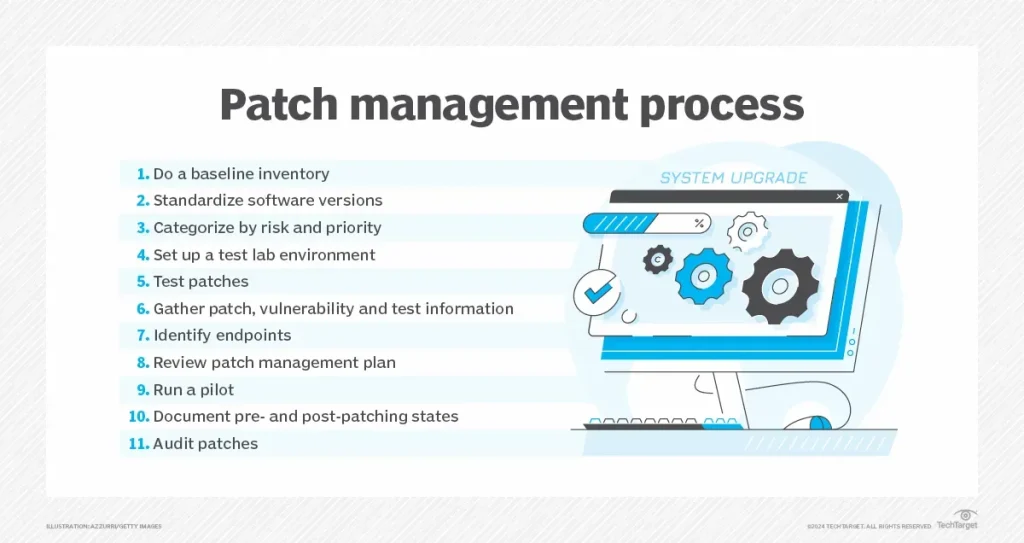
A practical patch management strategy for small businesses is built around five pillars—discovery, prioritization, testing, deployment, and verification—and tailored to your organization’s size, risk tolerance, and regulatory needs. By framing your patching program as an ongoing, repeatable process, you can achieve reliable security outcomes without the burdens of a large enterprise toolkit.
This approach emphasizes prioritization based on risk and business impact, leveraging lightweight tools and simple workflows that fit within existing responsibilities. For SMBs, the goal is to implement a documented, actionable plan that gradually improves resilience, rather than chase a perfect enterprise-grade solution. Emphasizing the phrase patch management for small businesses helps keep the focus on scalable, practical outcomes.
3. Asset Discovery and Inventory: The Foundation of SMB Patch Programs
A complete asset inventory is the bedrock of effective patch management for small businesses. Knowing what needs patching—across endpoints, servers, network devices, and cloud instances—enables accurate risk assessment and targeted remediation. Start with a simple, central repository that tracks hardware, operating systems, installed applications, and current patch levels.
Maintaining an up-to-date inventory reduces blind spots and makes prioritization decisions more precise. As you expand, consider lightweight automation to keep asset data fresh, while preserving the small team’s ability to act quickly. Clear asset visibility supports a smoother patch management process for small businesses and reinforces your overall security posture.
4. Prioritization, Testing, and Safe Deployment in SMB Environments
Not every patch carries equal risk. A solid patch management strategy for SMBs prioritizes updates based on vulnerability severity, exploit activity, asset criticality, and potential business impact. This risk-based prioritization ensures that the most dangerous gaps are closed first, while less urgent updates are scheduled to minimize disruption.
Testing is the safety valve that prevents patches from disrupting essential workflows. Establish a small testing group or sandbox that mirrors your production environment, validate core applications, verify backups, and plan a rollback strategy. Even lightweight testing can prevent costly downtime and build confidence in your patch management program for small businesses.
5. Deployment Best Practices: Automation, Windows Update for Business, and Cloud Options for SMBs
Deploying patches efficiently requires balancing speed with stability. SMBs benefit from defined maintenance windows, tiered rollout starting with a subset of devices, and automation where feasible. Using built-in tools like Windows Update for Business or comparable management options can streamline deployment without adding operational burden.
Cloud-based patch management can be especially valuable for distributed workforces, enabling centralized visibility and consistent updates across remote devices. Prioritize security updates as non-negotiable, particularly for devices handling customer data or remote access, and ensure that a tested deployment plan exists before broad rollout. These practices align with a practical patch management approach for small businesses.
6. Verification, Governance, and Continuous Improvement for SMBs
Verification confirms patches were applied successfully and systems remain stable. Regular audit checks, status reporting, and documentation of exceptions help demonstrate compliance and inform future decisions. Establish governance with clear roles, approval processes, acceptable downtime, and escalation paths for patch-related incidents.
Patch management for small businesses should be an ongoing discipline that evolves with threats and technology. Integrate vulnerability scanning, threat intelligence, and incident response planning to maintain a proactive security posture. Regularly review and revise the patch management process to ensure it stays aligned with business goals and regulatory expectations.
Frequently Asked Questions
What is patch management for small businesses, and why is it important?
Patch management for small businesses is a repeatable process that keeps software and devices up to date. It reduces security risk by ensuring critical updates are applied promptly, supports compliance, and helps minimize downtime from exploits. Start with a simple asset inventory and a predictable patching cadence to build a practical SMB program.
How does a patch management strategy support small business patch management?
A patch management strategy tailored for SMBs centers on five pillars—discovery, prioritization, testing, deployment, and verification. This approach supports small business patch management by focusing on assets, risk, and business impact, avoiding unnecessary complexity while protecting core systems.
What are best practices for IT patching for SMBs to minimize disruption?
Best practices for IT patching for SMBs include establishing regular patch windows, using tiered rollouts, testing patches in a sandbox, and having a rollback plan. Use automation where feasible with built-in tools to support patch management for small businesses, reducing manual effort.
How should a small business prioritize patches by risk and business impact in patch management for small businesses?
Prioritize patches by risk and business impact: consider severity, asset criticality, exposure, and how downtime would affect operations. In patch management for small businesses, address high-risk gaps first, especially on critical servers and threat-facing services, then schedule lower-risk updates.
Which tools and approaches work for patch management for small businesses without a large IT team?
For SMBs, effective patch management often combines native OS features (like Windows Update for Business), a lightweight management console, and optional cloud-based patching services. This IT patching for SMBs approach keeps costs down while ensuring security updates for small businesses reach all devices.
How do you verify, document, and govern security updates for small businesses as part of patch management?
Verification and governance ensure patches are applied successfully and systems remain stable. Regularly audit patch installations, document exceptions, and maintain clear policies on approval, downtime, and incident response. Coupled with vulnerability scanning and patch history, these practices reinforce security updates for small businesses.
| Pillar / Focus | Key Points | SMB Relevance / Impact | Practical Steps |
|---|---|---|---|
| Introduction & Why it matters | Patch management is foundational; prevents data breaches; reduces risk and downtime; aligns IT with business goals. | SMBs are common targets with limited resources; patching improves security, compliance, and business resilience. | Adopt a repeatable process, set clear goals, and communicate value to leadership. |
| 1) Discover and inventory assets | Build a complete, centralized asset inventory; know what needs patching; track versions and vulnerabilities. | Visibility reduces blind spots and improves prioritization. | Create an easy-to-update asset repository; include endpoints, servers, network devices, cloud instances; track software versions and vulnerabilities. |
| 2) Prioritize patches by risk and business impact | Rank updates by severity, asset criticality, exposure, and potential downtime. | Focused remediation where it matters most; aligns with ongoing operations. | Focus on high-severity, critical assets; plan for scheduling of lower-risk patches. |
| 3) Test patches before broad deployment | Testing reduces risk of disrupting critical workflows; verify backups and rollback options. | Increases patch reliability and reduces downtime for SMBs. | Establish a small testing group or sandbox; validate essential apps; verify backups; plan rollback. |
| 4) Deploy patches efficiently and safely | Balance speed with stability; define maintenance windows; use tiered rollout; automate where feasible. | Ensures patches are applied consistently without overburdening IT resources; supports remote work. | Define patch windows; start with a subset; leverage built-in tools for automation; schedule during off-peak hours; ensure backups. |
| 5) Verify, document, and govern | Verify patch success; document exceptions; establish governance policies; review regularly. | Demonstrates compliance and improves decision-making; provides audit trail. | Audit installation status; generate reports; maintain patch history; update policies and procedures. |
| IT patching for SMBs: tools & approaches | Use native OS features; lightweight management; cloud-based patching; prioritize security updates. | Provides practical patching without heavy tooling. | Leverage Windows Update for Business, macOS updates; cloud management; vendor advisories. |
| Security updates: continuous discipline | Ongoing discipline with threat intelligence and vulnerability management. | Keeps defense current as part of a broader security program. | Integrate vulnerability scanning; timely patch application; maintain patch history and reviews. |
| Common myths & best practices | Myth: patching is expensive; Reality: a simple, well-defined process can be effective. | Encourages adoption and realistic use of automation. | Start simple, automate where sensible, align with business hours, and have an incident response plan. |
| Case study snapshot | Illustrates real-world impact: reduced vulnerabilities and incidents with structured patching. | Proof of concept for SMBs seeking tangible results. | Implement inventory, prioritization, and automation; monitor results over time. |
Summary
Patch management for small businesses is a strategic cornerstone of resilient operations. By adopting an essential patch strategy—discover and inventory assets, prioritize patches by risk, test patches, deploy carefully, and verify and govern— SMBs can reduce risk, enhance security for customer data, and maintain business continuity. This approach, combined with practical IT patching methods and ongoing security updates, supports a safer technology environment and a clearer path to sustainable growth.